• Happy Birthday, Whirlaway (1938-53)! 👑👑👑

Slow (or no) click response at this website?

Joined
Oct 10, 2022
Messages
650
Reaction score
1,806
Location
New England
The past several days I've been experiencing slow (or no) responses to mouse clicks or finger pokes on the screen at this website. I have to click (or poke) twice to get links/buttons to open up. At first I thought it was the mouse or touch screen on our laptop but the same problem occurs with my cell phone. Sometimes it'll even get hung up with a blank screen and I either have to refresh the screen or go back and re-hit the link/button. Problem hasn't shown up with other websites that I've visited.

Anyone else having this problem?
 
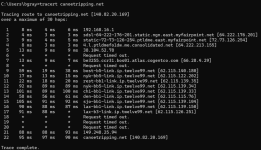
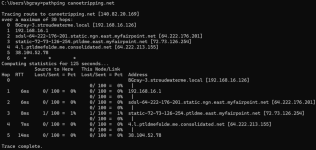
I have not been experiencing the problems with this site that you described and resetting your computer along with all of your local network devices will probably resolve the issue. However, you will need to use the trace route and path ping tools if you really want to 'dig into the weeds' with an issue like this. You can run these on Windows from the command prompt as shown below.

1765383499970.png

This shows all of the devices between me in the Portland, Maine area and the canoetripping.net server in Los Angeles, California along with the time it takes each one to respond. Many of these routers contain city references in their names so you can see that it traveled through Portland, Boston, New York, Chicago, Denver, and San Jose before getting to Los Angeles. The biggest slowdowns were in Chicago and San Jose. This only covers a very short window of time so the path ping tool can give a more detailed look over a longer period but it often doesn't look at the full route as shown below.

1765384178360.png

This shows the biggest slowdown as getting out of the Consolidated network to the backbone internet. All of these are well outside of your control so there isn't anyone you can yell at. You will also find that the routes change frequently based on the traffic conditions. Have fun and good luck,

Benson
 
Last edited:
The past several days I've been experiencing slow (or no) responses to mouse clicks or finger pokes on the screen at this website.

I don't have this problem, Tom, and no one else has reported it. Nor do I find reports of it on the Xenforo adminstrator's forum.

resetting your computer along with all of your local network devices will probably resolve the issue. However, you will need to use the trace route and path ping tools

Wow, Benson, that's the first time command prompt information has been displayed on this site. Our server is in LAX?

Tom, if you understand all that, I hope it helps. If not, I'll ask about the problem on the Xenforo site.

Benson is not only an encyclopedia of wooden canoe knowledge, he's a retired IT professional who walks around the WCHA Assembly grounds for a week carrying a laptop in a pack basket. (True!). Whenever someone has a computer or electric device malfunction, Benson takes out his laptop from the basket and solves the problem. I think he foiled a space alien invasion one morning, but I'm always fuzzy about things before noon.
 
Thank you, Benson, I ran the tracert and pathping tools and found that there were time-outs occurring at some of the addresses shown in the list. That probably explains the freezeups/dropouts I was getting. And several sites had long response times. I tried a router reboot last night and things seemed to be back to normal right afterwards but it was a quick test on the phone using wi-fi. This morning using the laptop with ethernet things seem to be working well. So it might have been the router reboot or it might have been that something got fixed or cleared along the internet highway. Hopefully it's stable for a while.

Glenn, thanks for checking in. I learned a bit about internet connectivity problems from using remote GIS servers over a crappy connection with limited bandwidth in my former job, but I've also had to troubleshoot home internet problems over the years. I hate our dependency on the internet but do enjoy the benefits, this site being one of them. :)
 
Our server is in LAX?

Yes, although it may not be near the airport. The Geolocation tool at https://www.iplocation.net/ip-lookup indicates that it is across the street from City Hall. The office building shown at https://maps.app.goo.gl/FvKjRVdRDJu2sWvX6 is the most likely location. These addresses are very approximate and often indicate sites associated with the network provider who issued the address. The firewall at my office in Portland, Maine is shown at various locations in Maine outside of Portland and in Albany, New York for example. The link below has more about my pack basket if anyone is curious.

Benson


Last edited:
Wish I could figure out what's going on. I've tried rebooting the fiber optic modem and the router, and cleaning up the laptop caches many times. No luck. The problems seem to be limited to this site and this site alone. Maybe Cogent Communications hates canoeists, or me. :LOL:

Tracing route to canoetripping.com [207.148.248.143] over a maximum of 30 hops:

1 3 ms 1 ms <1 ms 192.168.40.1

2 6 ms 4 ms 3 ms 72-73-82-1.burlvt.fidium.ccidns.net [72.73.82.1]

3 3 ms 3 ms 3 ms burl-lnk-70-109-168-201.ngn.east.myfairpoint.net [70.109.168.201]

4 3 ms 3 ms 4 ms 1.l.burlvtma97w.vt.consolidated.net [70.109.168.145]

5 9 ms 9 ms 9 ms static-70-109-171-14.burl.east.myfairpoint.net [70.109.171.14]

6 14 ms 13 ms 12 ms 38.104.52.78 (Cogent Communications)

7 * * * Request timed out.

8 16 ms 14 ms 14 ms endurance-international-group.demarc.cogentco.com [38.97.106.34]

9 * * * Request timed out.

10 16 ms 16 ms 15 ms 207.148.248.143

Trace complete
 
The problems seem to be limited to this site and this site alone.

I would encourage you to try a few other internet connections (neighbor, work, library, coffee shop, airport, etc.) to see if you get the same behavior. If it is only happening at your home then it may be worth calling your internet provider to see if they can help. Good luck,

Benson
 
Wish I could figure out what's going on.

Tom, this seems to be a problem isolated to just one user, you.

AI suggests the following, which I don't understand completely:

*****************

A slow or non-existent click response for a single user on a XenForo site is likely caused by browser-specific issues, browser extension conflicts (like ad blockers), or local network issues. Solutions include testing in incognito mode, disabling ad-blockers, clearing cache/cookies, or testing a different browser.

Troubleshooting Steps for a Single User:
  • Disable Ad Blockers/Extensions: Ad-blockers (e.g., UBlock Origin, Adblock Plus) can interfere with XenForo's jQuery AJAX requests, causing actions like clicking "Post" or "Like" to hang.
  • Use Incognito/Private Browsing: Have the user open the forum in an incognito window. If the issue disappears, it is confirmed to be a browser extension or cache conflict.
  • Clear Browser Cache & Cookies: Stale data or corrupted cookies can cause individual login issues or session delays.
  • Check for Browser Specificity: There are reported compatibility issues between certain XenForo versions and specific browser versions (e.g., older Firefox versions). Have the user try a different browser (e.g., Chrome, Edge) to confirm.
  • Check for Large Alert/Message Count: If the user has a massive amount of unread messages or alerts, it can slow down their page loads and button responses.
Server-Side Considerations (Unlikely if only one user):
  • If the user has unusual permissions [me: you have only standard permissions] or a vast amount of data being loaded, it could cause issues. However, if this is isolated to one person, local browser/machine factors are the most probable cause.
*******************

You might also try searching for info or similar problems on the Xenforo administrators forum HERE. You won't be able to post there, but you should be able to search and read.

You say it only happens on this site, but have you tried replicating your problem on other Xenforo platform discussion sites? This should help ascertain whether it is something in the Xenforo code that is causing your problem. The Xenforo admin site I just linked is itself a Xenforo platform site but you can't join it as a member, so maybe you have to find a few that you can join as a member to replicate your problem fully.

The only add-ons to the Xenforo code we have here are the five non-default color themes. Does the problem happen in one of these color themes and not in the dark or light default color theme?

 
Back
Top Bottom